Hello Kita

Hello Kita · Kita app for Waldfeucht

From the cloakroom to the office: one Kita app for the whole building.

Hello Kita is a web app for Kitas, nurseries and daycare centres. Parents report their child absent, staff keep the group diary and nappy log, and the manager looks after access, the staffing traffic light and the menu. It all runs in the browser and, if you like, sits on the home screen with a single tap.

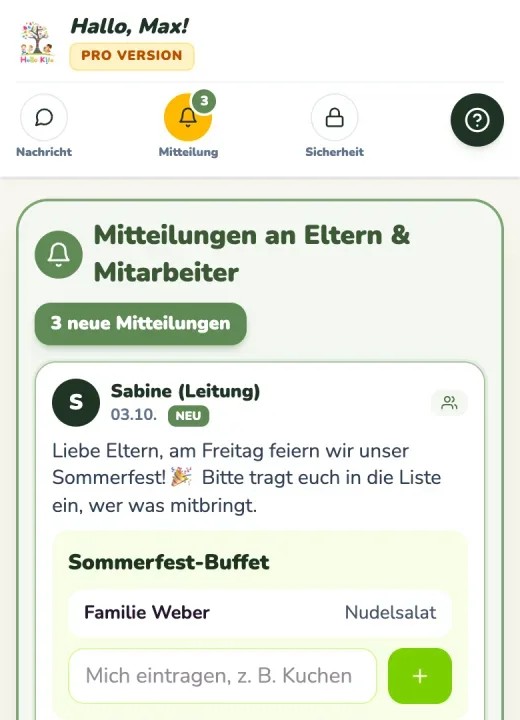
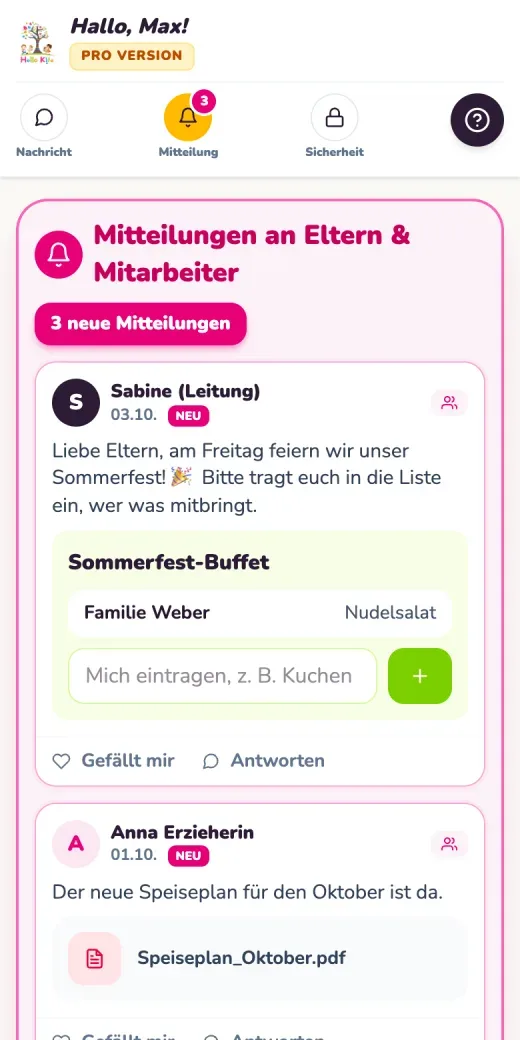
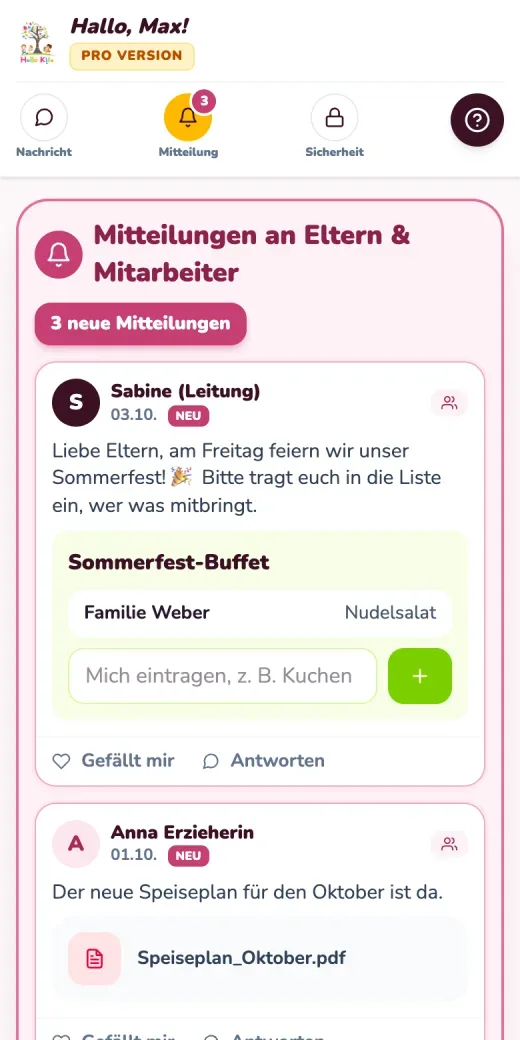
Hello Kita on a phone: announcements for parents and staff with a list for the summer party buffet, test data
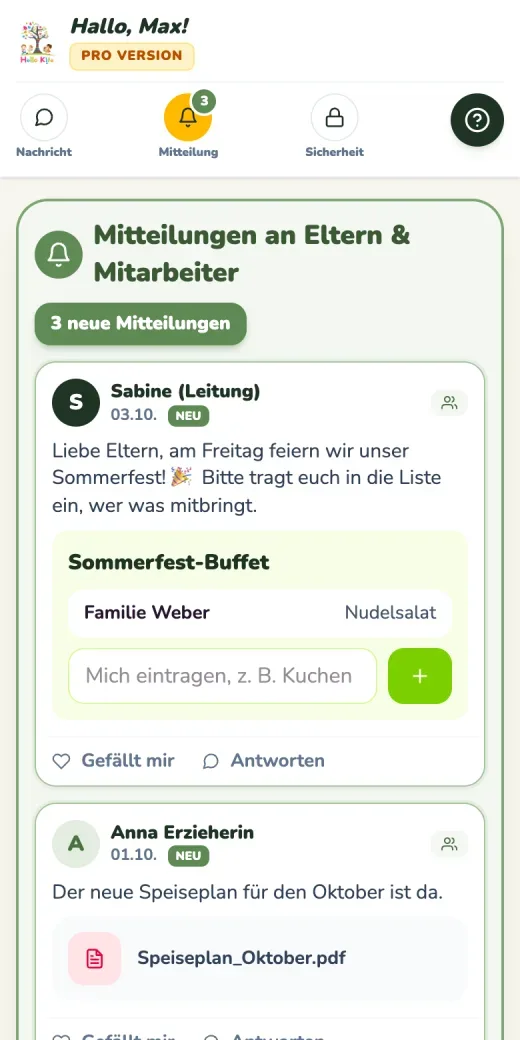
Announcements for parents and staff in the Natural Green colour theme, test data
  • Try Basic free for 14 days, Pro for 1 month
  • No payment details during the trial
  • From €24.92 a month, billed annually

In brief

What is Hello Kita?

Hello Kita is a nursery app from Wasa Consult in Heinsberg. It runs in the browser on computers, tablets and smartphones and brings parents, staff and management together in one place. Messages, the noticeboard, absence reporting, authorised collectors, the group diary and the menu are all part of Basic. Pro adds checking in at the entrance, meal ordering, the Portfolio Studio and reports for staff planning.

  • Web appIn the browser and on the home screen, no app store needed
  • 2 plansBasic and Pro, billed monthly or annually
  • 3 rolesSeparate access for management, staff and parents

Tour

Six stops. Come on in.

Every room in a Kita has its own jobs. Choose a room in the building or keep scrolling: each stop shows which Hello Kita feature helps there, and whether it comes with Basic or only with Pro.

  1. 1Stop 1 · Entrance

    At the entrance, the day starts with a single tap.

    When a child wakes up poorly, nobody needs to phone in: parents report the absence in three steps, whether it is illness, a holiday or another reason. The people authorised to collect are listed in the app with photo, phone number and written authorisation. With Pro, children check in and out on a tablet terminal without a PIN, and live attendance shows at any moment who is in the building, children and adults alike. In an emergency, that matters for fire safety.

    • Report a child absentBasic
    • Authorised collectors with photo and authorisationBasic
    • Checking in and outPro
    • Tablet terminal at the entrancePro
    • Live attendancePro
  2. 2Stop 2 · Group room

    The group room is where the day gets written down.

    The group diary gathers the activities, observations and news of every group. The nappy log keeps a record for each child, and when supplies run low, staff ask parents directly for nappies, wipes or spare clothes. First aid and incidents are recorded properly in the accident book. Pro adds a day by day record of settling in, which parents can follow wherever the team has shared it.

    • Group diaryBasic
    • Nappy log with supply requestsBasic
    • Accident bookBasic
    • Settling in, day by dayPro
    • Designing in Portfolio StudioPro
  3. 3Stop 3 · Kitchen

    By morning, the kitchen knows how many plates it will need.

    Parents can already see the weekly menu in Basic. With Pro, they order lunch in a monthly calendar with a cancellation deadline. Families top up their meal credit via PayPal or pay in cash, and the manager records the payment. The kitchen sees the number of meals per group, with allergies and diet types, and statements and receipts can be downloaded as PDF.

    • MenuBasic
    • Order lunchPro
    • Meal credit via PayPal or cashPro
    • Kitchen overview with allergiesPro
    • Statements as PDFPro
  4. 4Stop 4 · Staff room

    In the staff room, every practitioner has a space of their own.

    In the staff area, employees find their working hours, their leave, their certificates and the team noticeboard. Announcements can also be published for staff only. With Pro, staff report sick in the app and the manager is notified straight away. Pro also adds tasks and duties: jobs, the rota and handovers are assigned in the app rather than on scraps of paper.

    • Staff areaBasic
    • Noticeboard for staff onlyBasic
    • Staff sickness reportingPro
    • Tasks, duties and handoversPro
  5. 5Stop 5 · Office

    The manager's office is where access, staffing and the big picture come together.

    The manager sets up children, groups and access rights and invites staff and parents separately, by invitation link or by QR code with a printable letter for parents. The staffing traffic light, with a draggable pointer and your own wording, shows parents what care looks like today. For child records and consents, the manager sees every change with date and time. Pro adds reports with a forecast for the next three days, and the Friends' Association.

    • Administration, access and invitationsBasic
    • Staffing traffic lightBasic
    • Child records and consentsBasic
    • Reports and staff planningPro
    • Friends' AssociationPro
  6. 6Stop 6 · Home

    Everything that matters reaches the families at home.

    Parents read announcements with pictures and PDFs on the digital noticeboard, message the manager and staff, and take part in polls and lists of what to bring. Closure days, celebrations and parents' evenings are in the calendar. In Basic the app can be used in German and English, in Pro in twelve languages. Popup messages in Pro appear when the app is opened and, if you wish, also as a push notification on the phone.

    • MessagesBasic
    • Noticeboard with pictures and PDFsBasic
    • Polls and lists of what to bringBasic
    • Calendar and annual planBasic
    • Popup messagesPro
    • Twelve app languagesPro

Talk this through for our nursery

Who lives in the building?

Three floors, one shared plan.

Roles and permissions decide who sees what in Hello Kita. Each Kita sees only its own data. Within the setting, management, staff and parents each get their own access.

With Pro, the Friends' Association also gets its own access, for grandparents, local businesses and supporters, for example.

  1. Management

    Manages children, groups, staff and access rights, sends invitations and blocks accounts, sets the staffing traffic light and keeps an eye on consents and absences.

  2. Team

    Records in the group diary, nappy log and accident book, writes announcements for parents or for staff only, and finds working hours, leave and certificates in their own area.

  3. Parents

    Report their child absent, keep child records and consents up to date, read the noticeboard, dates and menu, and message the nursery, in German or English, or in Pro in twelve languages.

Pro · Portfolio Studio

In the studio, portfolios take shape like a photo book.

With the Portfolio Studio, your team creates a development book for every child, sorted by nursery year and spanning all their years with you. It works on the PC in the office, on a tablet in the group room or on a phone when out and about. Parents see the pages that have been shared with them and download the portfolio as a PDF.

  • 64 templates in 12 design styles, from profile page to learning story
  • Crop photos, add stickers and text, with the Quick Designer
  • Create together: parents fill in individual shared pages themselves
  • Leaving book with cover page, dedication and table of contents

Basic: view the Portfolio Studio and all templates. Pro: design, share and export as PDF.

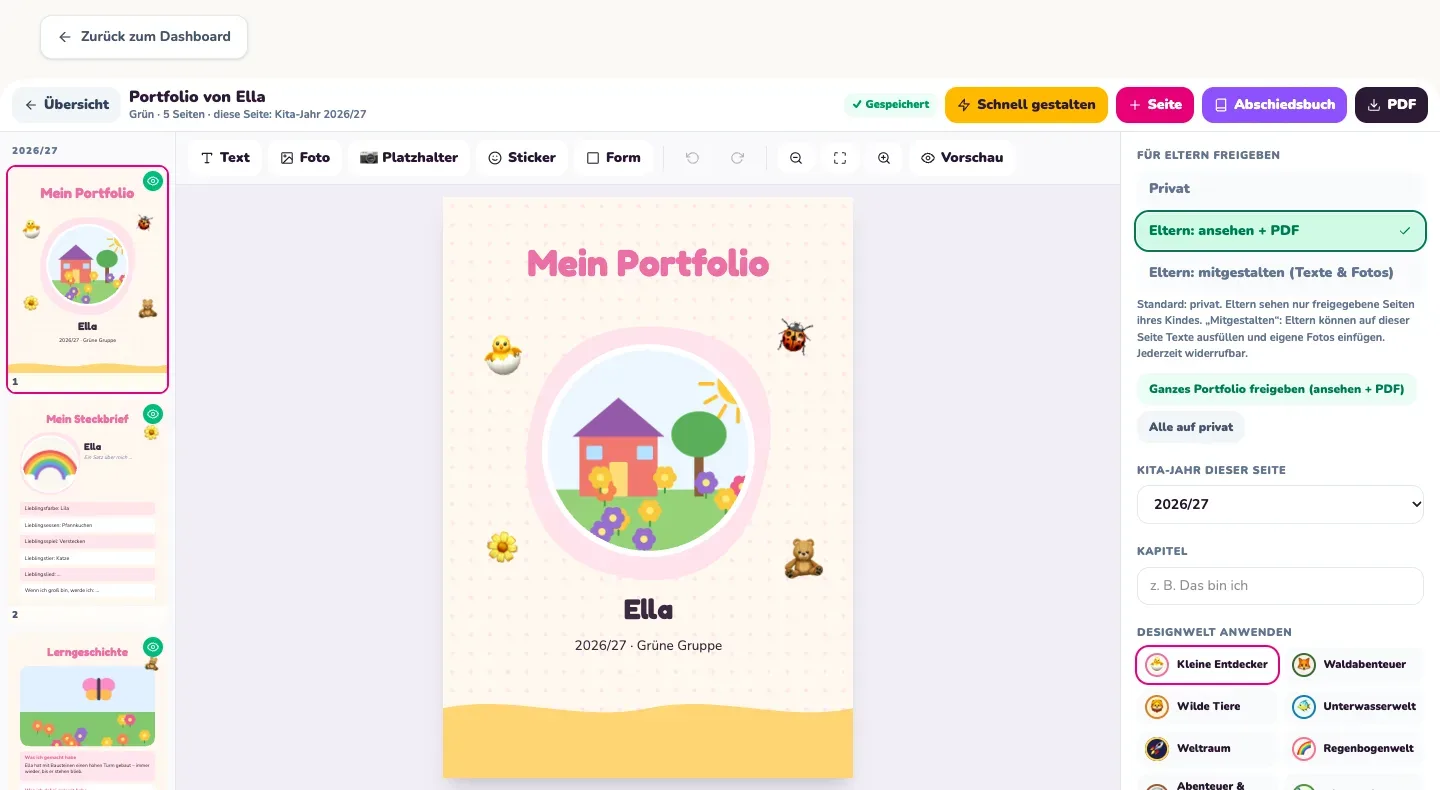
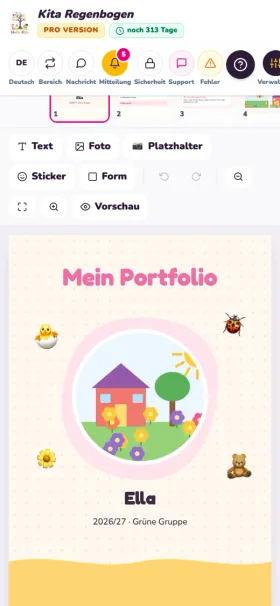
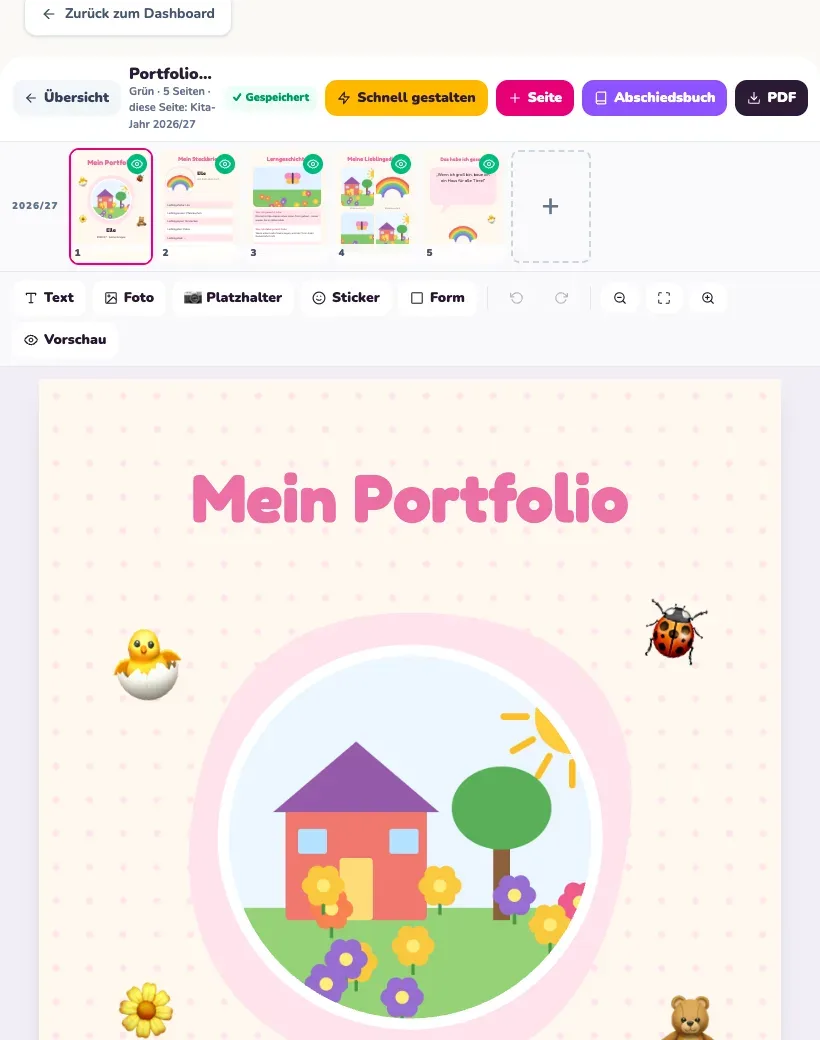
Portfolio Studio on a PC: the cover page My Portfolio for the test child Ella, with toolbar and sharing for parents
PC
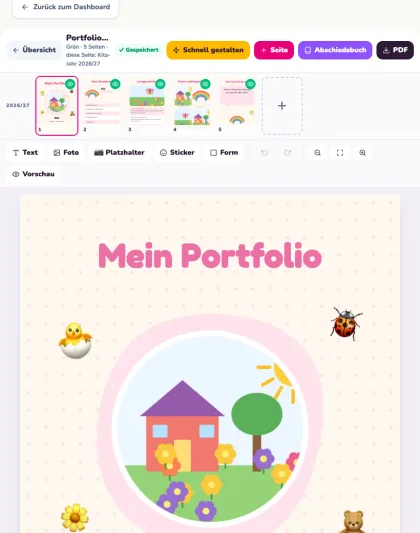
Portfolio Studio on a tablet: sidebar with five pages and the cover page My Portfolio, test data
Tablet
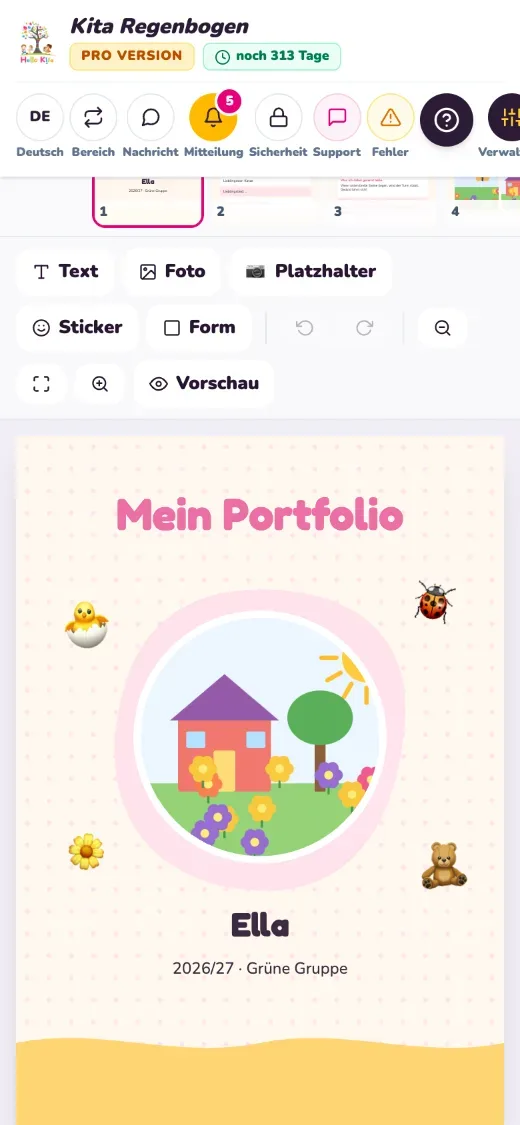
Portfolio Studio on a phone: the cover page My Portfolio for the test child Ella, test data
Phone

Colour themes and languages

A new colour for the whole building, in one click.

A colour theme changes the look of the entire app for management, staff and parents. Logos and important status colours stay as they are. Basic includes the Hello Kita Classic and Nordic Blue themes; Pro includes all nine colour themes and your own branding: your logo in place of the Hello Kita logo, on the login page and as the browser tab icon too.

Hello Kita Classic, preview with test data
Hello Kita ClassicPreview with test data
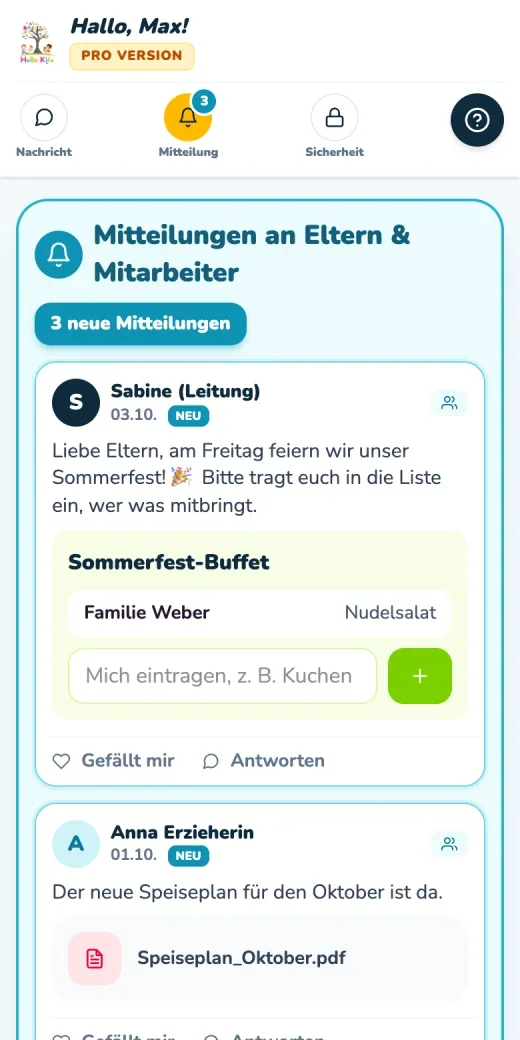
Nordic Blue, preview with test data
Nordic BluePreview with test data
Natural Green, preview with test data
Natural GreenPreview with test data
Berry, preview with test data
BerryPreview with test data

Every family rings the bell in its own language.

In Basic the app can be used in German and English. Pro offers twelve languages, and each family chooses its own. According to Wasa Consult, no external translation service is involved, so the content stays within the nursery.

  • German
  • English
  • Turkish
  • Arabic
  • Russian
  • Ukrainian
  • Polish
  • French
  • Dutch
  • Spanish
  • Portuguese
  • Romanian

Pricing

Ground floor or an extra storey: Basic and Pro.

Both plans are available monthly for flexibility, or annually with two months free. All prices exclude VAT at the statutory rate.

Basic

Try free for 14 days

€29.90per month

cancel at any time, effective at the end of the month

Everything a setting needs for its daily communication.

  • Messages, noticeboard, polls and lists of what to bring
  • Absence reporting and authorised collectors
  • Staffing traffic light and child records with consents
  • Group diary, nappy log, accident book and menu
  • Staff area with team noticeboard
  • App in German and English, two colour themes
  • 5 GB storage, support by email
Ask about the right plan

Pro

Try free for 1 month

€69.90per month

cancel at any time, effective at the end of the month

The complete digital organisation of your setting, with every Basic feature included.

  • Checking in and out, tablet terminal, live attendance
  • Lunch ordering, meal credit, kitchen and billing
  • Staff sickness reporting, tasks and duties
  • Reports and staff planning with forecast
  • Portfolio Studio and settling in
  • Twelve app languages, nine colour themes, your own branding
  • Friends' Association, 20 GB storage, priority support
Ask about the right plan

Basic: €299 per year, equivalent to €24.92 a month · Pro: €699 per year, equivalent to €58.25 a month

  • From Basic to Pro

    You can switch at any time, and all your data is kept.

  • More storage

    Can be added when needed, from €1.99 a month.

  • Initial setup

    Not necessary, but available from Wasa Consult on request for a single payment of €799.

  • Several sites

    Providers and groups of settings receive a tailored offer.

The first payment is only taken after the trial; during the trial you need no payment details and do not have to cancel. Annual plan: the term is one year from the first payment, paid in advance, and can be cancelled at any time with effect from the end of the contract year; there is no partial refund. This offer is aimed at childcare settings, providers and associations, not at consumers.

Moving in

How your Kita moves into Hello Kita.

Hello Kita is built so that the manager or the office can set everything up themselves, guided step by step in the app. According to Wasa Consult, a Kita is ready to use in under 15 minutes.

  1. 2 minutes

    Start the trial

    Register and get going, with 14 days of Basic or 1 month of Pro free. Every new setting is briefly checked so that Hello Kita stays reserved for real nurseries.

  2. 5 minutes

    Create your setting

    Enter the name of your nursery and its groups, and adjust the staffing traffic light to your own routine. Your Kita also gets its own web address.

  3. Then

    App on the home screen

    With a single tap, Hello Kita sits on the phone ready to use like an app, for staff and for parents.

  4. 10 minutes

    Invite staff and parents

    Invitations go out separately to staff and to parents. Each person opens their personal link or scans the QR code and chooses their own password.

  5. From day 1

    Ready to go

    The traffic light, announcements and more work straight away. After the trial you carry on with a paid plan without interruption, and all your data is kept.

Lock and key

The nursery decides who gets a key.

Hello Kita processes sensitive information about children. That is why Wasa Consult sets out exactly how the data is kept separate, protected and eventually deleted.

  • Data processing agreement

    The data processing agreement under Art. 28 GDPR is concluded digitally when you register. The nursery or its provider remains the controller; Wasa Consult processes the data only on their instructions.

  • Every Kita on its own

    Each Kita sees only its own data. Health information, emergency contacts and authorised collectors are stored separately and protected by their own permission checks.

  • Encrypted and protected

    Data is encrypted in transit using TLS, and passwords are stored encrypted. Photos and documents are kept in protected storage that is not publicly accessible.

  • Access only with approval

    Wasa Consult only accesses a nursery's data once the nursery has approved it, through an access request in the app.

  • No advertising, no tracking

    Hello Kita does not use cookies for advertising or tracking. The browser stores only what is needed to sign you in and keep the app quick to use.

  • Deletion when the contract ends

    Once the contract ends, the nursery's data is deleted within 30 days. On request, Wasa Consult provides an export beforehand.

Enquiry

Ring the bell at Wasa Consult.

Tell us what Hello Kita should take care of in your nursery, how many groups you have and whether Basic or Pro looks like the better fit. Wasa Consult in Heinsberg will get back to you with an answer for your setting.

Would you rather talk?

+49 2452 860 83 73info@wasacon.net

Wasa Consult · Owner Oleg Wasa
Am Diebsweg 22, 52525 Heinsberg

When you send this form, your enquiry is passed on to Wasa Consult.

Questions

Frequently asked questions about the Kita app

Call+49 2452 860 83 73
Do parents and staff need an app from the App Store?

No. Hello Kita is a web app that runs in the browser on computers, tablets and smartphones. A single tap puts it on the home screen, where it then opens just like an app. There is nothing to install from the App Store or Google Play, so you can reach parents and staff on any common device.

What does Hello Kita cost?

Basic costs €29.90 a month or €299 a year, which works out at €24.92 a month. Pro costs €69.90 a month or €699 a year, which is €58.25 a month. All prices exclude VAT at the statutory rate. Extra storage can be added from €1.99 a month, and the optional initial setup by Wasa Consult costs a single payment of €799.

How long can I try it, and what happens afterwards?

You can try Basic free for 14 days and Pro for one month, with no payment details and no notice period. The first payment is only due once the trial has ended. If you want to carry on, you book a paid plan. Your work then continues without interruption, and all the data you created during the trial is kept.

What is the difference between Basic and Pro?

Basic covers daily communication: messages, noticeboard, absence reporting, authorised collectors, the staffing traffic light, group diary, nappy log, accident book and menu. Pro adds checking in and out with a tablet terminal, meal ordering with credit, staff sickness reporting, tasks and duties, reports, the Portfolio Studio, records of settling in, twelve app languages and all nine colour themes. You can switch to Pro at any time, and all your data is kept.

Can we set up Hello Kita ourselves?

Yes, that is how it is meant to work. The manager or the office sets up the nursery directly in the app, guided step by step: create the setting, add the groups, invite staff and parents. According to Wasa Consult, a Kita is ready to use in under 15 minutes this way. If you would still like help, you can book the optional initial setup by Wasa Consult for a single payment of €799.

How is the children's data protected?

When registering, the nursery concludes a data processing agreement under Art. 28 GDPR. Data is encrypted in transit, each Kita sees only its own data, and health information, emergency contacts and authorised collectors are stored separately. Wasa Consult only accesses the data once the nursery has approved it. After the contract ends, the data is deleted within 30 days, with an export beforehand on request.

Is there an offer for providers with several nurseries?

Yes. For providers and groups of settings running several sites, Wasa Consult puts together a tailored offer. Use the form to tell us how many settings you run and which features matter most to you. Hello Kita is offered exclusively to childcare settings, providers, associations and other business customers, not to consumers.

How do I cancel, and what happens to our data?

Monthly plans can be cancelled at any time, effective at the end of the current month. An annual plan runs for one year from the first payment, is paid in advance and, once cancelled, ends when the contract year runs out; there is no partial refund. After the contract ends, the data is deleted within 30 days, and Wasa Consult provides an export beforehand on request.

Can nurseries in Waldfeucht use Hello Kita?

Yes. Hello Kita is a web app that runs in the browser. It works in any setting with internet access, in Waldfeucht just as anywhere else. The manager or the office sets up access directly in the app. Wasa Consult, the company behind Hello Kita, is based in Heinsberg and can be reached by phone and email with questions about plans and setup.

Guide

+49 2452 860 83 73

Legal notice

Privacy